I’m on version 21.0.4, installed on a remote server that I access over the Internet. To feel safe, I have configured the firewall to allow connections only from my office IP, my accountant’s IP, and a fixed IP provided by NordVPN, so I can connect from my laptop when I’m out of the office. With this setup, I feel reasonably safe, but some functionalities in Dolibarr are blocked, such as credit card payments and downloading documents from the server, like price offers.
What is your opinion on stopping the use of the firewall? Is the risk too high, or can it be managed?
Nothing is 100% safe, I suppose the real question is if the gains from the blocked functionalities are important enough to open things up.
Another way to do it would be to put a website like WordPress, Prestashop, etc. on the frontend to process orders and payments. Give the website access to use the API to update data in Dolibarr. This opens things up while limiting surface of attack to your ERP.
I know lots of Dolibarr servers are open to the web. With good web server, proper Dolibarr setup and some security hardening it is safe. Also good to have backups too.
Thanks for your time! I run the site on my own dedicated VM with OVH. I use Debian 12 with Virtualmin/Webmin, so I believe the server setup is fine.
I mainly sell B2B with payment terms of around 30 days by invoice. Although I mention credit cards, I rarely receive card payments, so I find setting up the structure you suggested a bit of an overkill.
What do you mean by “security hardening”? As far as I know, I’ve followed all recommended security instructions.
I also have a rigorous backup routine: every morning a full backup is made and sent to two different locations, and every 20 minutes a differential backup is created and sent to the same locations. In addition, OVH performs a full server backup every night, which is retained for one week.
My concern is that, in case of an attack, the attacker might gain access to my backup settings (except for the OVH backups) and delete them.
Hey, i’m working on implement a WHITE LIST filter to login on my module TOTP 2FA:
By now you can only filter IPs by Country, but someone suggested to me implement a filter directly by certain IPs, so white list method: you define some IPs to have permission to login.
We use OVH, the application and DB should be in seperate VM’s/cloud instances with a firewall in between …the DB should only be accessible by the application server and not directly available on the internet.
Finally I’ve done what you reccomended, the DB on a separate server with a firewall in between. I’ve also harndend the Dolibarr installation according to all reccomendations and I’m now ready to open op 443 and 80 so that I can use all the functionality like card payment et.
I’ve set it up with 2FA from @caos30, FailToBan and 2 layers of firewalls. I’ve also moved the DB to another separate server that is behind a firwall so it can only be reached from my Dolibarr installation. Antivirus for uploads I had since earlier, and a lot more.
First of all, I want to thank you for your recommendation!
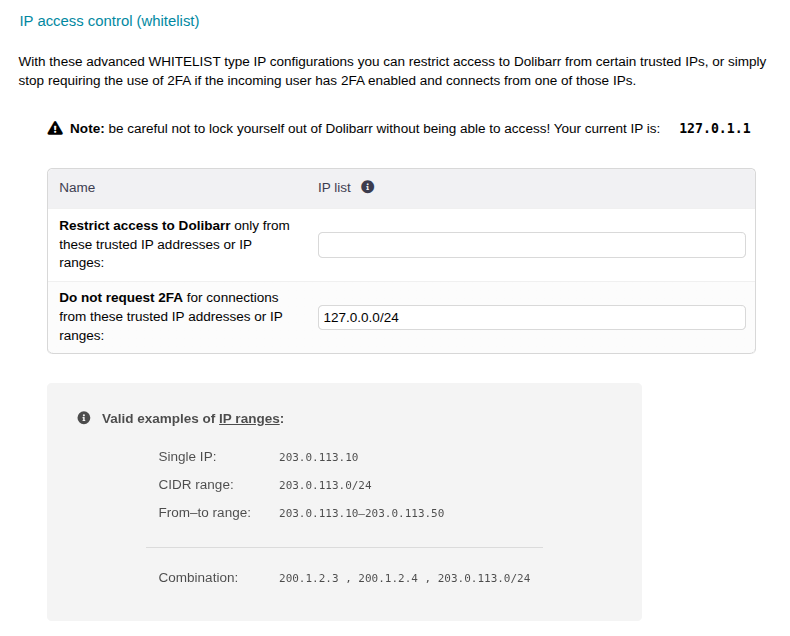
I’d also like to add that in the latest versions, I’ve included another type of FILTER: you can now define a WHITELIST of IP ranges. This means that ONLY visitors trying to access Dolibarr from those IPs will be able to log in!
It’s an extremely paranoid-level measure, but there’s no doubt it’s the ultimate form of access control.
Spoiler: I’m planning to soon add a LOG section to the module for tracking access and rejections for audit purposes.
Honestly, what started as a personal project to add two-factor authentication to my Dolibarr has turned into a pretty comprehensive access control tool. I have to mention my gratitude to a few customers who bought the module and then invested some euros to add these kinds of new features.
There are even a couple of people who made a donation to me… considering the module’s very low price.
To all of them, thank you. Just as I thank everyone who supports Dolibarr’s development through their work or money. It certainly still has a long way to go in terms of improvement, but it keeps getting better with everyone’s best effort! (hehe, and recently with AI ).
AI, yes! I’m not a programmer and sometimes when there are issues with modules, and even Core, it can take a very long time until there is a fix. Nowadys I do it by myself in 10 minutes using ChatGPT and propose the solution on GITHub!


 ).
).




