
Hi,
I have a large (>7000 items) amount of components. Each component has a “warehouse” (location in the main warehouse) and sometimes they can be moved to a new location due to having more of the same item, or having less and occupying space in vane. When making an MO (manufacturing order) the BOM (bill of materials) is created. That works fine, if something is missing then I get a warning etc, I get the amount of each individual item required to manufacture the product and so on.
So far so good, the problem is that the BOM does not include the warehouse (location) for each individual item. So, one has to click on each item to find out where it is in the main warehouse (aka default warehouse). This is tedious and takes time because you have to do lots of trips back and forward from the computer to the location and back.
I’d like to know if there is any tag that I can add to the ODT BOM document that would include the warehouse. Something like {line_product_warehouse} that I could add to the lines of object in the BOM.
Does this makes sense? Is it possible to do it?
Best regards,
VV
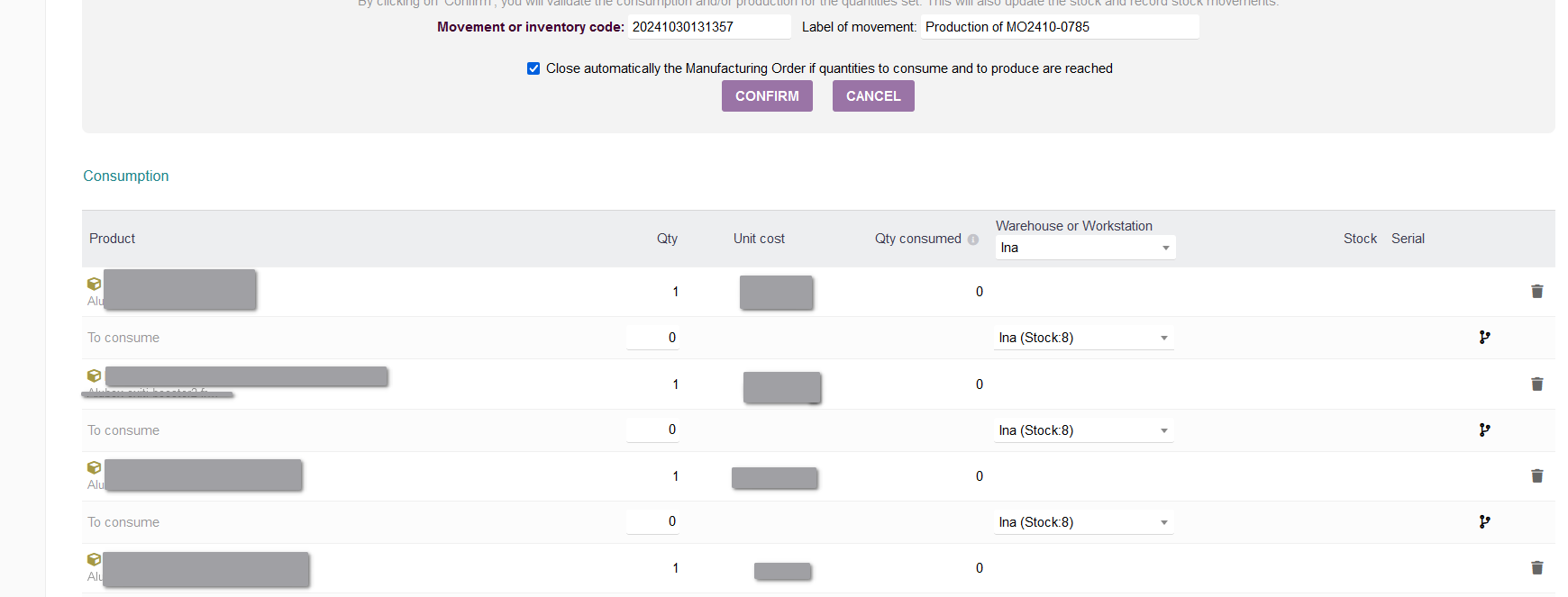
Hi,
Thank you for your reply. How have you modified the display of the MO? Mine still shows two columns, “Consumption” and “Production” side by side.
Also, is there any possibility to print out this? When going around in the actual warehouse it is very handy to have a piece of paper so one can check what have been picked already. Some other programs we have used before (InFlow) call this a “Pick List” and it is very handy. Some of our assemblies can have 300 - 400 entries and that’s a lot to scroll on a tablet running Dolibarr.
Best regards,
VV
Hi @kyoritsu ,
could you indicate your dolibarr version, the difference can come from this.
Also, the need you describe could be also developped as a specific pdf format for the BOM indicating the warehouse of the part.
Hi pragmatech64,
The dolibarr version is 19.0.2, but I think erikvanberkum meant that there was a modification to the original code. At least that’s how I understood.
Here I’m posting a picture of what it looks in the old software (InFlow), “Location” and “Sub-location” now became “Warehouse” in Dolibarr. For instance “Location” D601 (shelf) and sublocation “A” (row) now in Dolibarr became “Warehouse” D601_A where D601 is the shelf and _A is the row in the shelf.
This is a very short BOM, but we somtimes have serveral hundreds of lines.
Best regards,
VV

Hi,
We have done the same, moved from inFlow and have a very similar situation. I can not find a good solution for this. All I came up with was using the Export Assistant to extract all Product to a spread sheet and include the Warehouse, so we can reference it when we are looking, but we have to create the MO to generate a list of the product in the BOM.
Did you find a better way?
No, I didn’t find a better way. In fact that’s the way we do it. The MRP module is lacking in Dolibarr, perhaps there are not so many users involved in production.
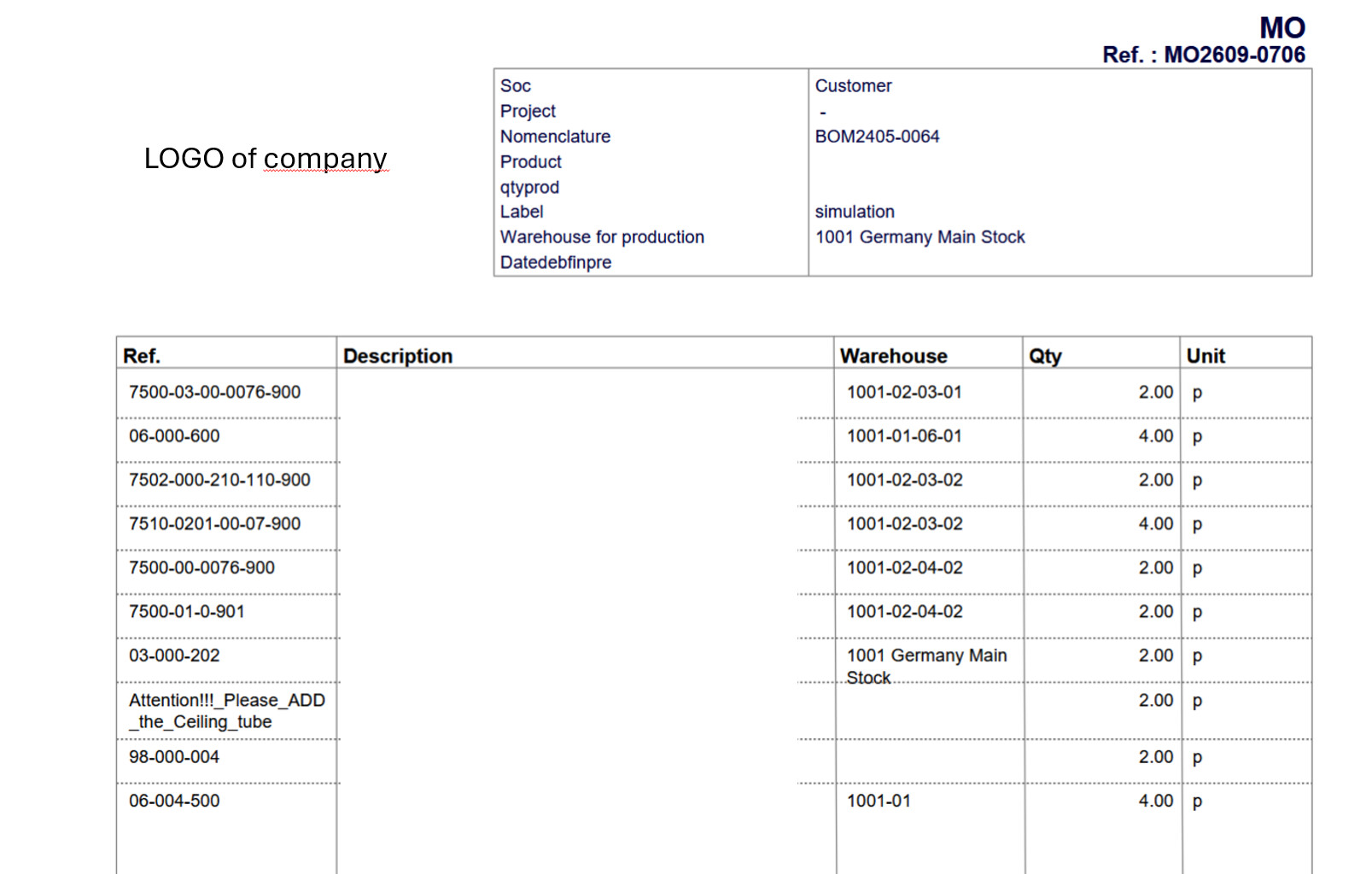
That would be nice, but the template I have, “Vinci”, doesn’t have “Warehouse” only Ref, Description,Size, Qty, Qty Total  , Is this a standard template? I’m still on version 19, we use tags a lot and the latest versions have made very difficult the use of tags and categories. , but if this is a standard pdf template then perhaps it is worth upgrading after all. I’ll have to deal with the tags/categories problem some other way. Thanks for posting anyway.
hi - it is not a standard template. but I could check what else is needed to make it work.
Will come back to you later on.
@kyoritsu Some of what you’re looking for is found in this free module I made:
The primary goal was to have location within warehouse tracking and management. The module grew to accommodate Row/Rack/Bin labeling and pick sheets. I think it might be exactly what you’re looking for. I know this is some time after the original post, but sharing here for visibility.
The pick sheets look like this:
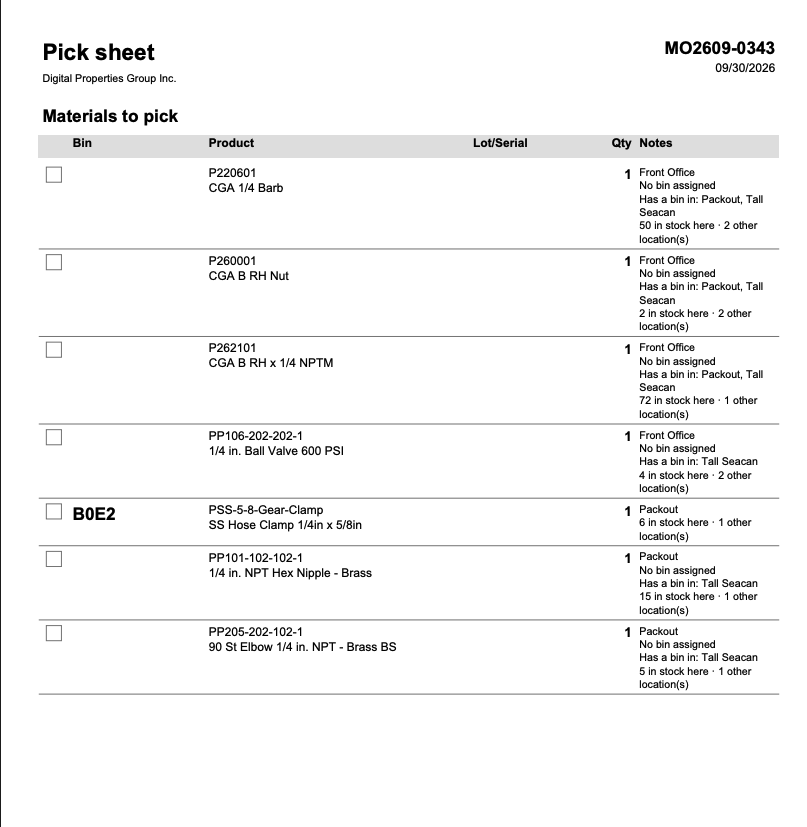
If a product has an assigned bin in the warehouse chosen, it will display that bin in the location. I seem to need to do some work about surfacing a tagged bin foremost. The current logic prioritized minimizing movement across warehouses.
I would love some feedback on that component and logic.
There is also a resulting place sheet that goes with the pick sheet, to assign resulting location in the warehouse for finished goods:
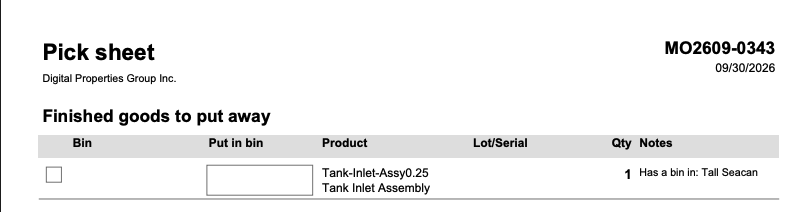
To speak to your issue about upgrading and being worried about categories: I built this toolset for managing tags/categories much faster:
It’s a UI for creating, sorting, bulk tagging and more. As we adopted better data standards, this tool was excellent for keeping on top of under-populated tag fields on products. It’s tested up to v22. I’ll be upgrading to 24 soon and so you can expect my modules to stay up to date with core’s major releases.
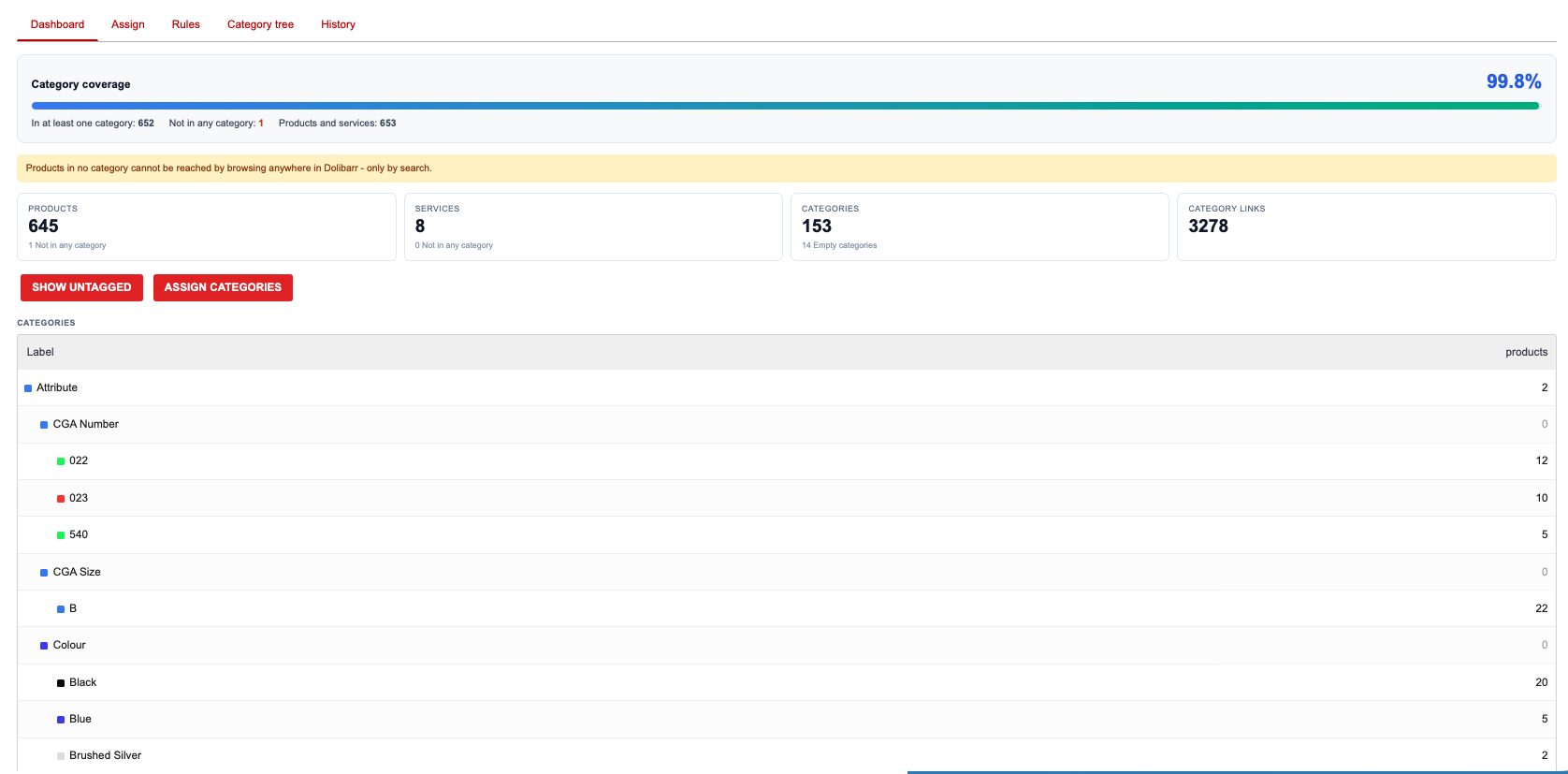
There is some UI/UX improvement to be made that was uncovered as we used the tool into 150+ categories. I’ll likely work on that today; making the tag tree collapsible in the main card view.
This morning I added a hierarchy setting panel, as well as a ‘take stock from’ option into the settings for the bin locations module in a new 2.18.0 build.
I also added toggles for pick priority beating expiry, and document warehouse is preference which are both off by default.
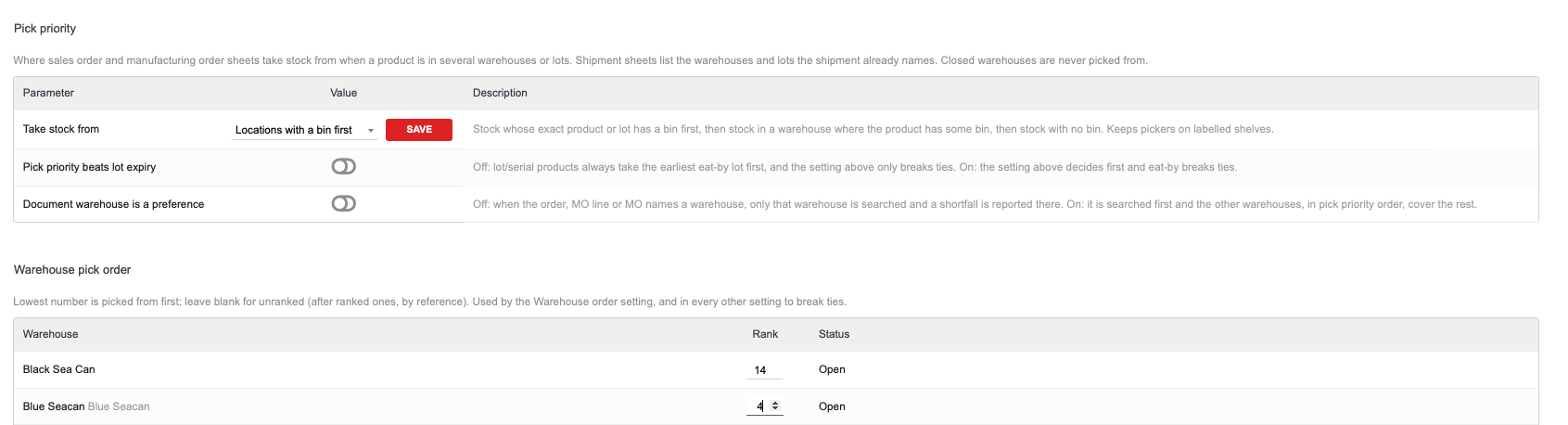
I would love some feedback on these as solutions and improvements. I realize the bug with my earlier code was an alphabetical sort, which has now been replaced with a priority based sort logic.
Oh, this is a lot of information to process. I’ll take some time on Saturday to test this on a non-production Dolibarr instance. About the bins, we do not have any trouble with that because we treat every aisle/shelf/rack/box/bin as an independent warehouse and this has work for us since version 12. So basically A101 B3 means Aisle A, Shelf 1, rack 01, box B, bin 3. This is no problems at all to understand and follow. The problem is when making a BOM it doesn’t show warehouses (aka location by aisle/shelf/rack/box/bin) so you have to either have a tablet with you while running around in the warehouse and picking parts or as we suggested above make a MO and then exporting the movement, importing the CSV into a table and printing the pick list. Which is detrimental to time and accuracy. The suggested PDF template of the MO solves most of the hazzle by saving the export/import operation, but still it doesn’t show the warehouses on BOMs. Incidentally on version 19 I had to comment a line of code to be actually able to see the warehouses in the MO because they have been blocked from showing. See attached screenshot, I know nothing about php, I’m an EE forced to work with Dolibarr because in the company nobody wants to do it  , but I figure that if I commented the line as shown in the screenshot then my warehouses were back in the MO and they did! In general Dolibarr is an excellent software, but I still think it is not targeting production floors because of the lack of users, or any other reason. As explained in my original post I relied many years on InFlow Inventory until they decided to remove the onsite licenses and being part of a company dealing with restricted access we could not upload all our BOMs, part lists etc to an unknown server in North America , hence we tried different things Odoo for instance and some others and decided that even though Dolibarr is not 100% there it is the best there is at the moment.
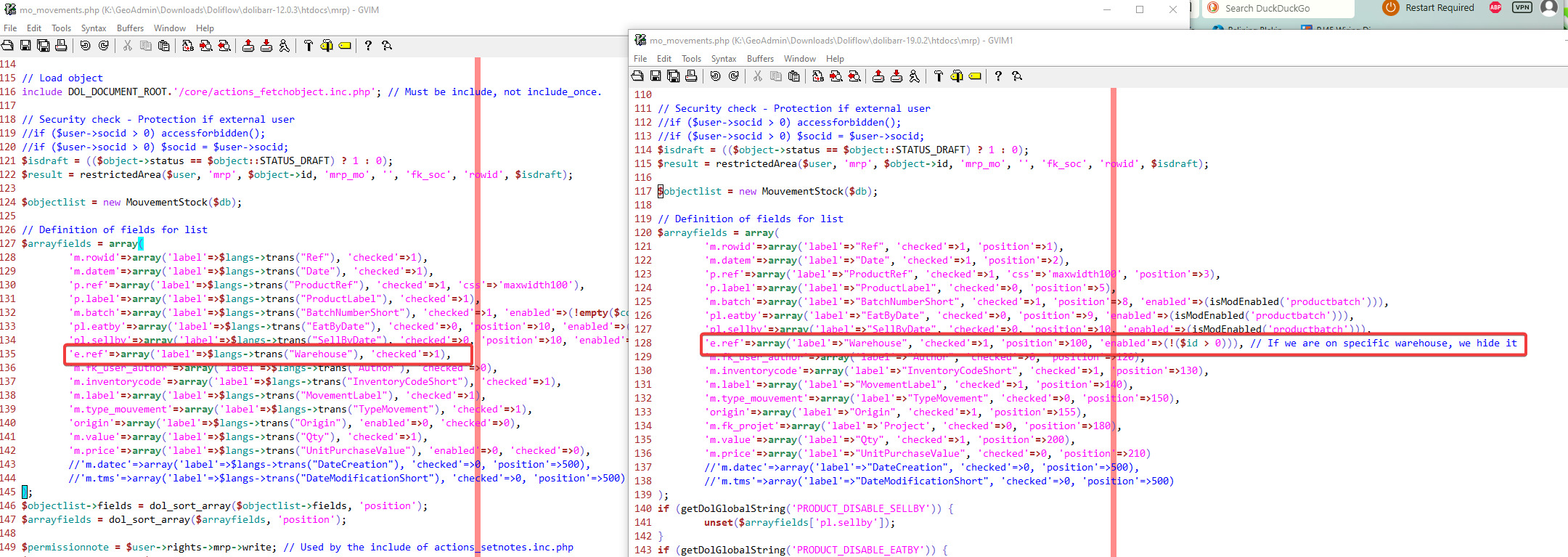
just to be clear for anybody else who may need this, the part we commented was everything after ‘position=100’, like this:
…‘position=100’, //'enabled=>(!($Id>0)))…
If you do give the module a try, there is an import/export function that can be found in the ‘warehouse levels’ menu item below the Warehouses heading in the left menu.
You should be able to move your complex warehouse structure over in a few clicks and then benefit from these tools. I believe warehouse makes sense, but the granular levels configuration and it’s associated tools should live in a separate tool.
I just made some improvements to the UI for that area of the module.
You won’t have label configurations but I don’t know that you need labels/bin lists made. We find it helpful. The module has tools for printing different types of labels/sheets per row/shelf/bin/whatever you configure.




