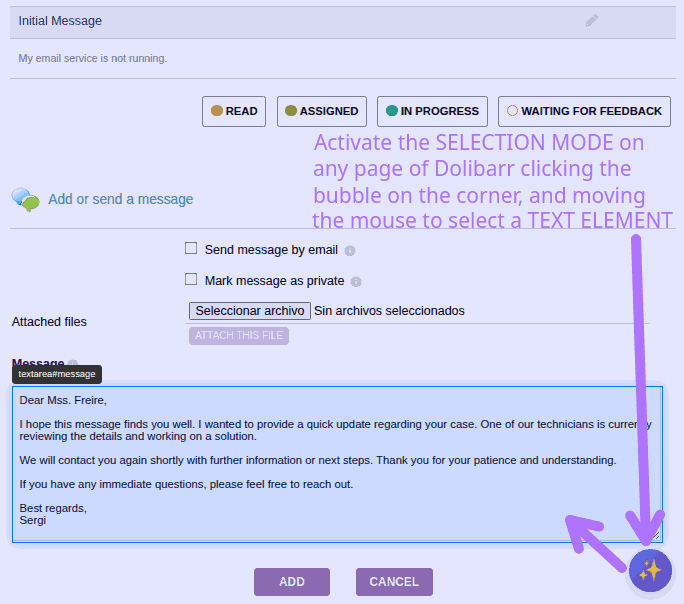
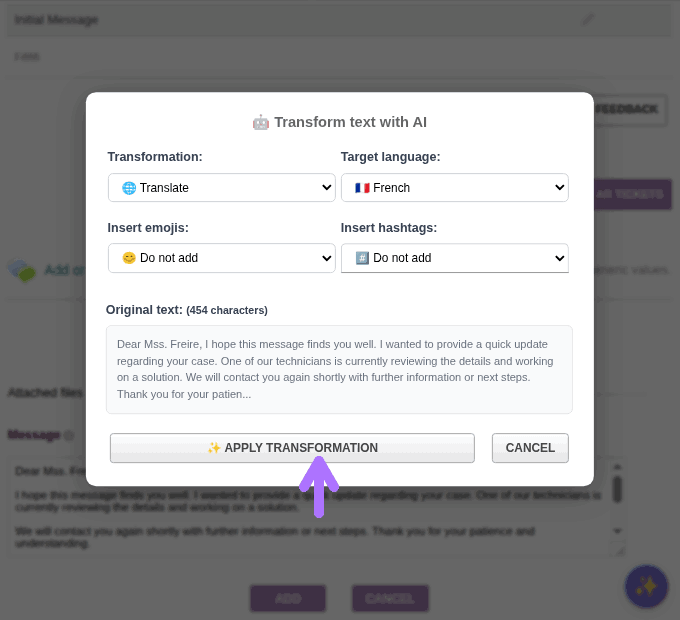
AI-powered text assistant: Summarize, translate, improve writing, change tone, or apply custom transformations to any text — all without leaving Dolibarr.
Multi-provider compatibility: Works with the major AI platforms — OpenAI, Anthropic, Mistral, and DeepSeek — so you can choose the one that fits your workflow and budget.
Flexible text selection: Click on any editable element (text boxes, textareas, CKEditor fields, paragraphs…), select by drag & drop, pick an entire container with Shift+Click, or type free text from scratch — 4 selection modes available.
Rich transformation options: Choose from predefined actions (improve writing, translate, summarize, expand, simplify, formalize, casualize) or write your own custom instruction to combine any adjustments you need.
11 built-in languages: English, French, Spanish, German, Italian, Portuguese, Catalan, Dutch, Russian, Chinese, and Japanese — with custom language support via free-text instructions.
Social media extras: Optionally auto-insert emojis and hashtags into your output — great for LinkedIn, X, or Instagram posts.
Remembers your preferences for a faster and more continuous workflow.
Why is it useful?
If you deal with emails, notes, proposals, or any kind of text inside Dolibarr, AI Writer eliminates the constant copy-paste to external AI tools. Everything happens inline, directly in the ERP.
It’s perfect for multilingual teams that need quick translations or for writing polished, professional communications without spending extra time on editing.
The custom instruction mode is especially powerful for advanced use cases: combine multiple transformations, adapt tone and language, or apply domain-specific rules — all in a single prompt.
More information
Full user manual and details available on the module page in Dolistore.
Hope you find it as useful as I do!
Feel free to ask any questions.
Tried AI Writer? Share your experience!
Nice work, @caos30 — the multi-provider support is a smart design choice. Locking onto a single AI vendor is usually the first thing that makes teams hesitant to adopt AI features inside ERP, so offering that flexibility from the start removes a real barrier.
A couple of deployment questions:
Is the API key configured per-user or shared at instance level? For multi-user setups, per-user keys matter for cost accountability and for teams that use different providers depending on language or task type.
Does the transformation have access to wider document context — for example, the invoice header, client name, or other fields on the same record — or does it work only on the selected text? “Translate” and “summarize” are self-contained, but “improve this product description” benefits from knowing the product category or what the client relationship looks like.
I’ve been working in a similar space (AI layers over Dolibarr business data), so genuinely curious how you’ve approached the context boundary.
I’ve published a more detailed user guide in my commercial website:
Directly answering to your questions:
Nop, the API key is NOT PER USER, but per Dolibarr instance. Well, if you use multi-company module you can set different API keys per entity.
The LLM only have access to the SELECTED/PROVIDED TEXT, not contextual data. For the text transformations you need to provide EXTRA DATA to the LLM you must use the Transformation labeled as “Custom instruction” and then you can use your own custom prompt mentioning that extra data needed to do the correct transformation.
Having said this, you gave me an interesting improvement:
Let to use wildcards like in n8n, for example {{invoice.title}} to then be able to have a “prompt template” able to be applied on whatever invoice to do certain text transformation.
But sincerely, you can understand that this would complicate a lot the interface and the module itself, because is would be needed to define a collection of objects (invoice, thirdparty, proposal, ticket, etc.) and their available wildcards.
So, i don’t find that this “improvement” would be the best option.
In the meanwhile, as i said, you could write a custom prompt with the needed extra data
The idea of this module was to let the user easily get help from an LLM to REWRITE a text, not to BUILD a non-existing text. I means: to translate, summarize, fix grammar, etc. Even with the “custom instruction” you can get a “different” version from the original text.
But the idea was to transform text, not to create from scratch.
Having said this, your suggestion of work with contextual data is quite interesting, but perhaps it is more near to an agent than to a writting tool. You know.
Anyway, i will continue thinking in how to work in this direction you have suggested. It’s very interesting. Thanks!
Thanks for the detailed answers, @caos30 — both questions clearly explained.
The “transform vs. create” framing is the right one. What you’ve built is a text quality layer: it operates on content that already exists. The context-aware generation case — where Dolibarr entity data (client, product category, prior invoice lines) feeds into the prompt — is a genuinely different problem class, closer to agentic: the ERP record structure becomes the retrieval layer. Your call to stay focused on transformation is a sound scope decision.
Per-instance API key makes sense as the default; the per-entity override for multi-company is a clean escape hatch for teams that need cost attribution or different provider contracts per entity.

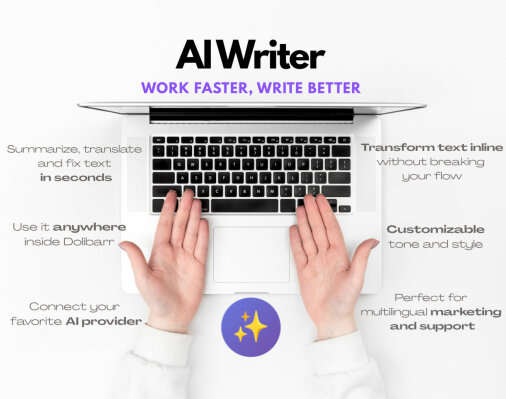
 AI-powered text assistant: Summarize, translate, improve writing, change tone, or apply custom transformations to any text — all without leaving Dolibarr.
 Multi-provider compatibility: Works with the major AI platforms — OpenAI, Anthropic, Mistral, and DeepSeek — so you can choose the one that fits your workflow and budget.
 Flexible text selection: Click on any editable element (text boxes, textareas, CKEditor fields, paragraphs…), select by drag & drop, pick an entire container with Shift+Click, or type free text from scratch — 4 selection modes available.
 Rich transformation options: Choose from predefined actions (improve writing, translate, summarize, expand, simplify, formalize, casualize) or write your own custom instruction to combine any adjustments you need.
 11 built-in languages: English, French, Spanish, German, Italian, Portuguese, Catalan, Dutch, Russian, Chinese, and Japanese — with custom language support via free-text instructions.
 Social media extras: Optionally auto-insert emojis and hashtags into your output — great for LinkedIn, X, or Instagram posts.
 Remembers your preferences for a faster and more continuous workflow.