
Dear
i am new user but i am facing some problem with vat %.
in the neterlands we have to apply 21% but the system don t allow us to do and give only 3 option like 0,5 and 19%.
could you please advise how to solve it
thanks
Hi,
You can set the various VAT rates from the Dictionaries, click “Settings” on the vertical menu on the left.
Marcello
Hi,
If you like…
I can send you a manual how to do this… in Dutch.
Al so how to set up a bookkeeping in Dutch.
Kind regards,
Klaas Oldenburger
thanks Mgribaudo, found it
Klass is u can send me will be very appreciated
Hi,
OK. Here it is.
Have fun with it.
If you have questions, let me know.
Kind regards,
Klaas
Starten met boekhouden.pdf (1.3 MB)
Hi Klaas, i know this is an old post, but i am reading your pdf, and was wondering, where i can find, or can you provide me the NL-VERKORT rekeningschema?
It seems there is non in Dutch in Dolibarr. (after fresh install)
Voor any-one wanting a Dutch solution: download Klaas his awesome pdf en see this post
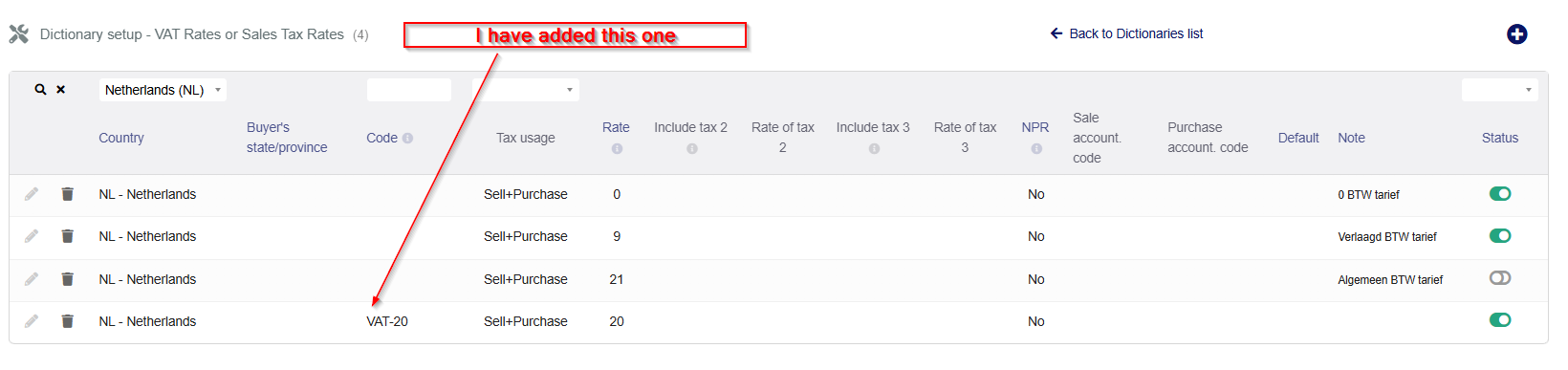
Hi @WolfqualityBV You can add new VAT by following this
-
Go to Setup (Home → Setup)
-
Click on Dictionaries
-
Find and open VAT rates (sometimes called “VAT” or “Tax rates”)
-
Click New VAT rate
-
Enter:
-
Rate:
21 -
Country: Netherlands
-
Fill other fields if needed (label, accountancy codes, etc.)
-
-
Save

Thanks & Regards
Saikat Koley
Software Developer(Dolibarr)
Call/WhatsApp : +919903256573
Email : saikatkoley@hotmail.com
https://www.linkedin.com/in/saikatkoley/




