I’m encountering an issue where customers receive the following error when trying to sign proposals online as seen in the screenshot:
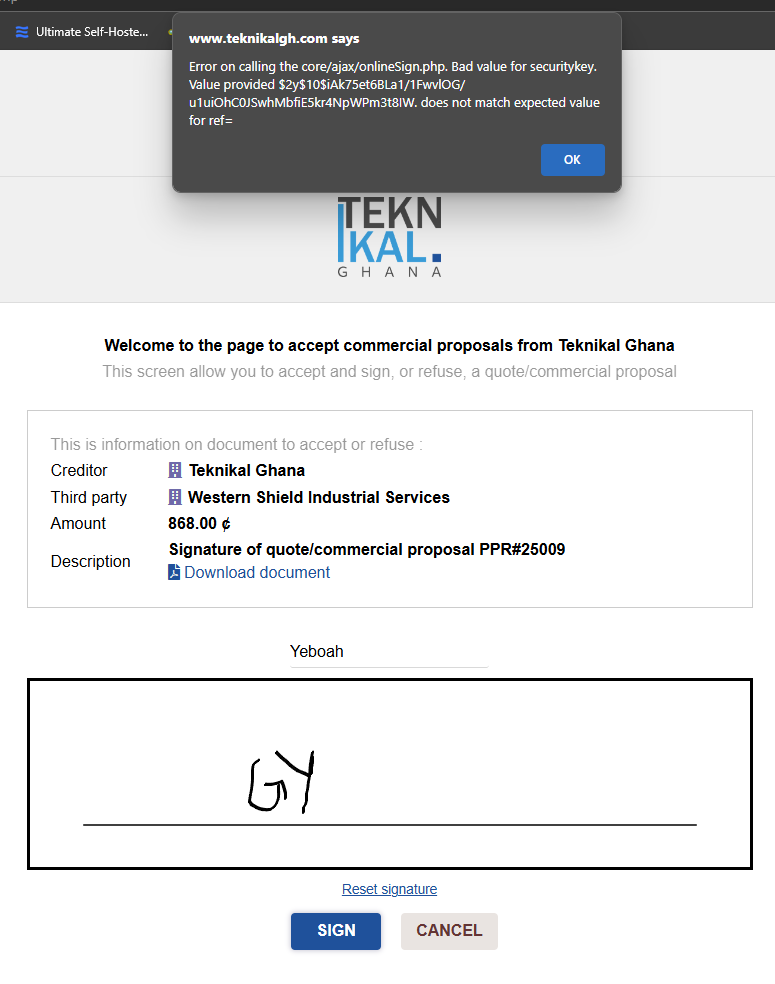
@eldy, can you please help?

I’m encountering an issue where customers receive the following error when trying to sign proposals online as seen in the screenshot:
@eldy, can you please help?
which dolibarr version?
can you make an example with a url you can share with us?
Does it look like something like this?
/public/onlinesign/newonlinesign.php?source=proposal&ref=<ref removed>&securekey=<security key removed>
I am running 21.0.1
Let’s use the URL below
Proposal Link
can you enable debug logging while you sign it? and then send us the output of that
Hi @jonbendtsen, debug logging is enabled and there’s no error aside the toast message that comes up.
any different results in different browsers, phones, laptops, tablets, … ?
Seems to be everywhere unfortunately 
I just tried in my development 22.0.0-beta, I’ll try my production 21.0.1 now - where it also worked
Do you have some kind of proxy in front?
Nope, no proxy.
is it only this proposal, or also other proposals?
this happens for all proposals
okay, the next thing I would try would be a reinstall, possibly even using a backup file as a mariadb starting place
Hello James,
from looking at your screenshot, I see you named the proposal PPR#25009 - can you try to use a different schema for the ref number without the # ? The proposal ref is part of the URL and might possibly mess things up with this special character, which can have a particular meaning in a URL, especially if it does not get encoded.
hi @priojk your proposed solution fixed the issue. 
@jonbendtsen I really appreciate the effort in helping out.




