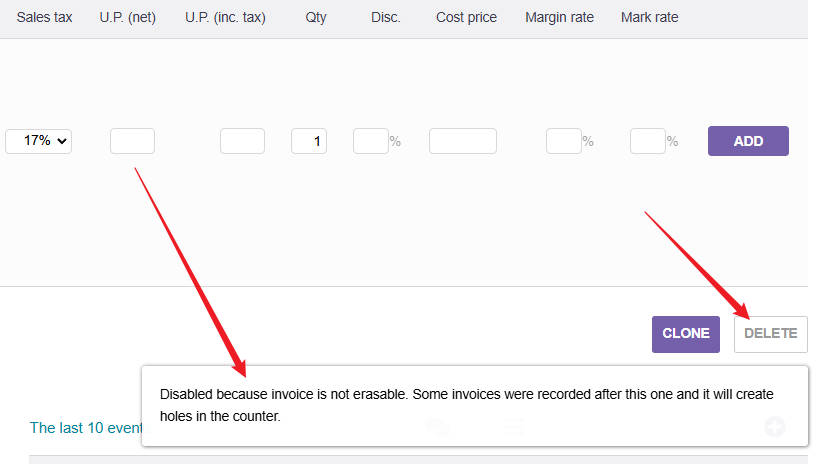
I will suggest you check the code once, where the code for this button is written, so from there you will get an idea of what permission or logic needs to be satisfied to enable this button.
Check the URL, which page is it referring to, then go there and check. That’s it. If you are not a developer, then I don’t think it would be easy for you to try. I am not sure how familiar you are with Dolibarr development.
I got the dolibarr git cloned to my mac laptop, and then I used grep in the terminal to find all lines with INVOICE_CAN_
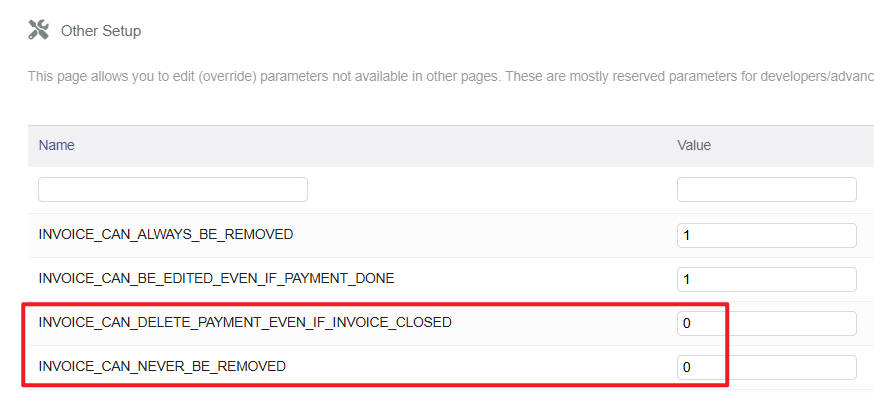
And I found that it seems like at least in the develop branch, the setting you need to use is INVOICE_CAN_NEVER_BE_REMOVED and the value should be 0 to remove the invoice.
If you invoices have payments, you might want to use INVOICE_CAN_DELETE_PAYMENT_EVEN_IF_INVOICE_CLOSED
You don’t write which dolibarr version you run, and I hope it is not develop.
sorry @TuHao I have not, and I am not being able to for at least a week. This weekend I am organizing a large dance event, which is what I use Dolibarr for, so I wont have time until next week, and before that I need to do the life things that this dance event has postponed.
You can find the source code on github, find the relevant file that matches the url you’re looking at and then you ask some AI to analyse how to use this variables to achieve what you want.
That is where I’d start, and then also read the code myself.
Hi @TuHao — this is a two-part problem in v23 that catches a lot of people: the constants AND the permissions both need to line up.
Step 1 — Check user permissions first
Go to Home > Users & Groups > [your user] > Permissions > Invoices. There are separate permissions for deleting draft invoices and deleting validated invoices. Even with the right constants set, if “Delete” isn’t explicitly checked for validated invoices the button stays greyed out.
Step 2 — The right constants in v23
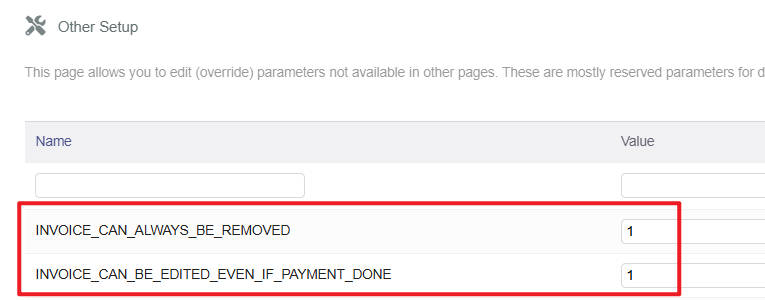
In Home > Setup > Other setup, set:
INVOICE_CAN_ALWAYS_BE_REMOVED = 1
Make sure INVOICE_CAN_NEVER_BE_REMOVED is not set (or explicitly 0)
No server restart needed — takes effect on next page load.
Step 3 — Invoice status matters
A validated (status = 1) invoice with no payment can be cancelled back to draft first (Actions > Cancel), then deleted as a draft. That path always works regardless of constants.
For your empty/invalid invoices specifically: if they have no lines and no payments, cancel → delete is the cleanest route and avoids any database surgery.
Let me know which step resolves it — happy to dig further if the permissions check doesn’t fix it.