
U.P. (inc. tax) showing “0” in Purchase Order line for all the product.
This issue found after upgraded from V22.x.x to V 23.0.1
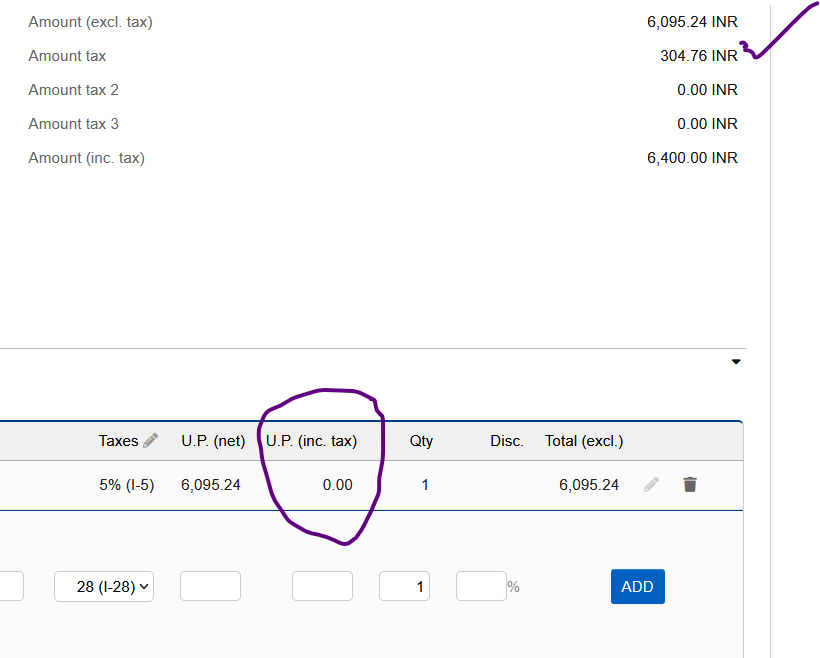
Please edit the headline and add something about tax in purchase orders @sribalaji.tvn
What are your tax settings? and do you have a VAT number on this vendor?
Also, you can set some PDF settings here /admin/pdf_other.php called Show column Price including tax
Please note: No issue found in other modules like Invoice, Sales order, Supplier invoice and Quotation.Only in the Purchase Order module the amount not showing in U.P. (inc.tax). at the time of creation. No issue in PO edit mode…….
It was working fine in V.22…
@sribalaji.tvn I think you should search if someone else has filed a similar issue on Dolibarrs github page - where bugs are handled - and if you can not find a similar/identical issue, then file one (with pictures)
It is showing U.P. (inc.tax) in Purchase Order edit mode….. not showing in create PO
okay @sribalaji.tvn
Here’s what I would suggest you do to track down and fix it:
- Go to GitHub - Dolibarr/dolibarr: Dolibarr ERP CRM is a modern software package to manage your company or foundation's activity (contacts, suppliers, invoices, orders, stocks, agenda, accounting, ...). it's an open source Web application (written in PHP) designed for businesses of any sizes, foundations and freelancers. · GitHub
- Switch the download “button like” away from develop to tag 23.0.1 - I will not give you the direct link because I believe it is valuable to learn to navigate the different branches and tags.
- From here navigate these folders: htdocs/, fourn/, commande/, and it might just be the card.php file you have to be looking at.
- A good think to look at would be the history in top right corner - are there any commit message that stand out as something that might be related? - I do not particular see any, so back to the last page with code
- What you want to be searching for is something like
create'yes, there is a little'because then you mostly get lines related to the action of create - not that action. Then you compare the create and edit action and find the line where the U.P is shown




