
Uploaded v0.2 to GitHub, quite a lot of work, but I’m happy with it.
v0.3 is out on the Github (GitHub - InPoint-Automation/Dolibarr-KSeF-Module: Module for Dolibarr adding interface with Polish KSeF system, based on https://inligit.fr/cap-rel/dolibarr/plugin-facturx), with the updated API endpoints and some other small changes.
@jonbendtsen the Third Party page now has an option to exclude that third party from KSeF invoicing as well, vs only having that in settings. It can be modified by modifying the third party.
Will wait and see what additional changes may come about on the day of going live, and once it’s confirmed working with the live system will bump version to v1.0.
Tomorrow I’m headed to an 8 hour course on KSeF so will be able to run this current system past smarter people than me and see what other potential issues may remain.
I’ve used the Demo environment to submit test invoices using proper credentials, and it works for both tokens and certificates, online and offline.
As far as outstanding issues, I’m only tracking a minor issue where I forgot to grab the VAT ID for third party instead of Prof ID 1 (usually NIP) if Prof ID 1 is blank, which results in an XML validation error in this situation because it fails to provide any NIP number. Workaround is just copying the VAT ID into Prof ID 1 in the meantime. This is already fixed on my end and just waiting push to GitHub.
I will also default the settings for new installations to use the Demo environment instead of the Test environment for new installations with this change.
Copying what I put into the v0.3 release notes, in case of any errors about XML validation (since KSeF API doesn’t provide specific feedback on XML validation errors) here’s some troubleshooting to catch errors in case of failed uploads.
- Download the schemat_FA(3)_v1-0E.xsd from the KSEF-Docs github
- Download the XML from the submission attempt either in the KSEF Submissions tab or on the invoice KSEF tab.
- Use xmllint to verify the XML against the schema, for instance
xmllint --schema schemat_FA\(3\)_v1-0E.xsd FA3_invoice_2(1).xml FA3_invoice_1.xml
4.This should provide you specifically what validation check is being failed.
I believe I will be able to at least finish the final piece of the KSeF puzzle before 1.0 - downloading the invoices from KSeF API. I do not have time to get the entire goal of also importing these into Dolibarr finished before the system goes live, but at least we can pull the invoices and view their data from within Dolibarr.
To help inform the import function, I am curious how others process incoming invoices for their company - for instance just writing the data, creating a third party if it’s missing, etc is somewhat straightforwards, but associating line items with products etc can get very messy as its frequently not an exact science and I’m not sure how/if it should be part of the module or not. In my company we have a (albeit poorly made) python program that we’ve added to bit-by-bit over the last year that helps speed up this process from OCR’d invoices and fuzzy-matching existing products, but I’m curious what others do before we figure this out.
The incoming invoices page will be in v1.0 and can view incoming invoices
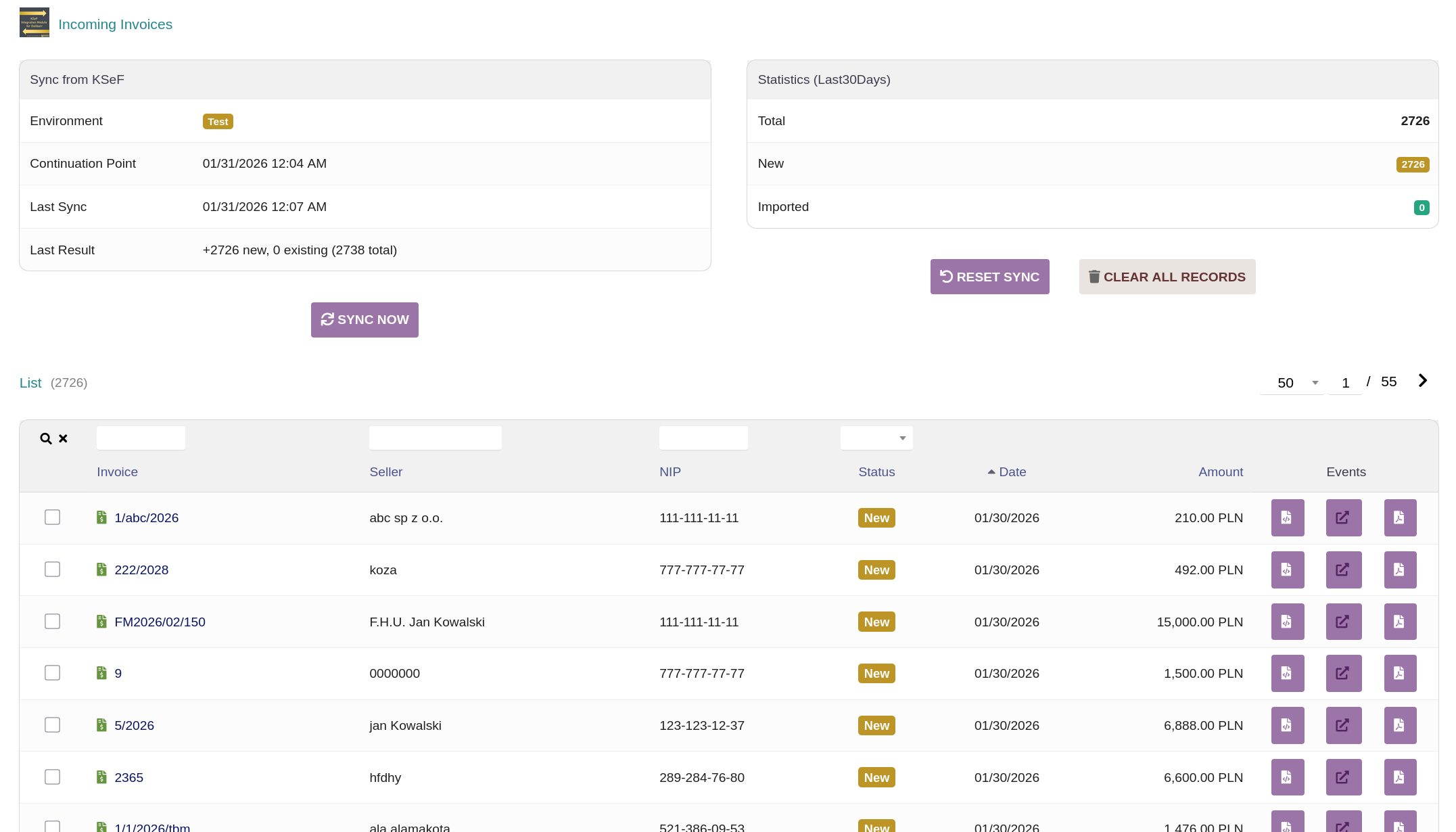
Downloading the invoices from KSeF in bulk is working. However, in the test environment I’ve seen it can potentially be very slow for huge numbers of invoices - downloading 30 days of test environment invoices for instance attempts to download and process ten thousand invoices each time it syncs which takes about 5 minutes, especially if you leave debug logging on and end up with a 300MB logfile of every database action… However I successfully grabbed 29199 invoices from the test environment so it does work.
It’s using the high water mark synchronization method from the KSeF docs.
It’s also possible to become rate-limited, but thankfully they provide a “retry after” response in the API and this response will properly block the sync button.

I have based the preview card for these imported invoices on the card.php from htdocs/fourn/facture/card.php, just with more limited functionality. The Import to Dolibarr button and tab are unfortunately just a placeholder and have no function (yet).
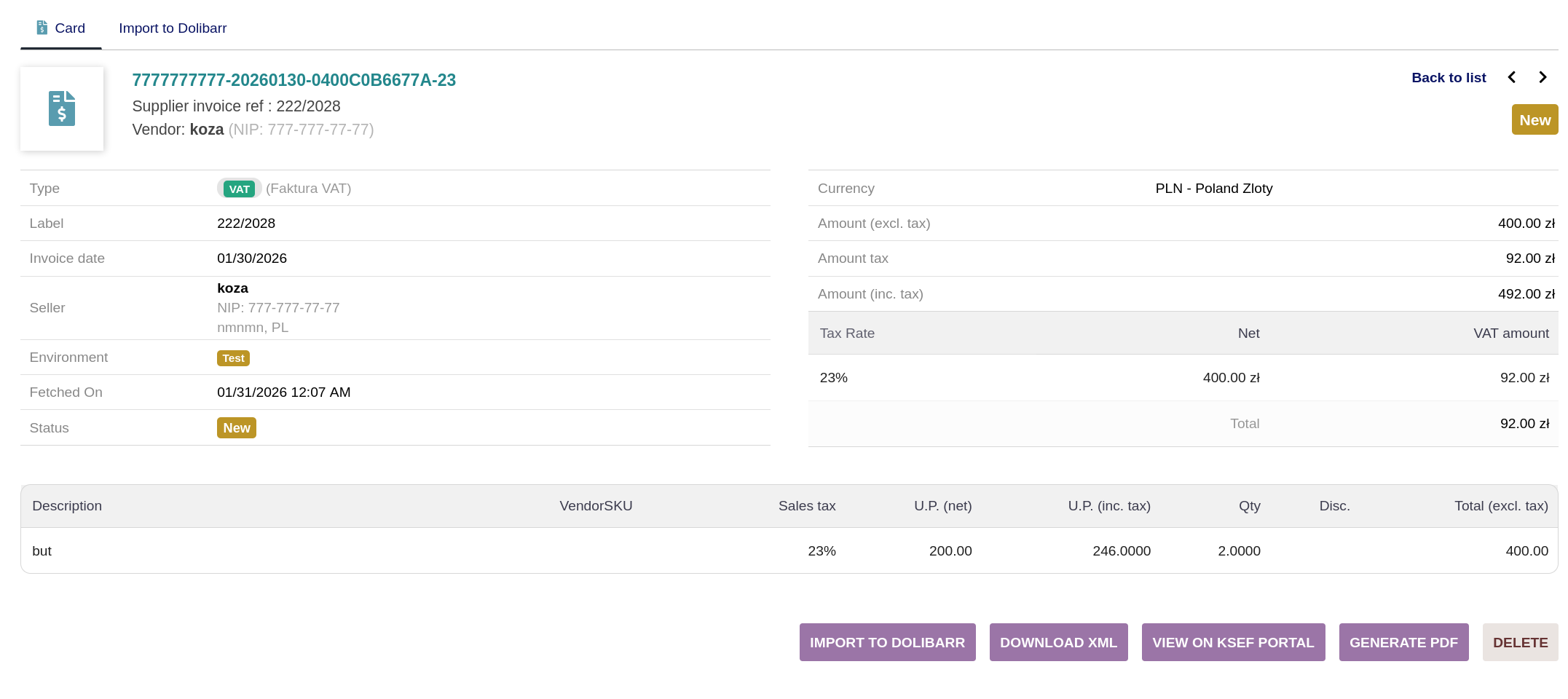
The Generate PDF button is somewhat working and uses TCPDF to generate a PDF in the KSeF style, since the KSeF API does not allow for downloading the visualization PDFs. However, it needs some more polishing so I’m not sure if I will finish this before 1.0. I would also like to allow overriding the PDF generation for standard invoices with this as well, in case this style of visualization is preferable.
I have managed to get the PDF visualization working closely enough to mimic the visualization available on the KSeF website for incoming invoices and so v1.0 will also contain a second “generate” button to the Linked Files box for outgoing invoices (using the same visualization class), which instead of using the Dolibarr templates generates invoices in the style of the KSeF visualization using TCPDF. This may be preferable for some than the sponge/crabe templates. However, in the event of Offline invoices this button will gray out and be disabled. Right now only the sponge/crabe templates have the additional logic to handle such a case at the moment.
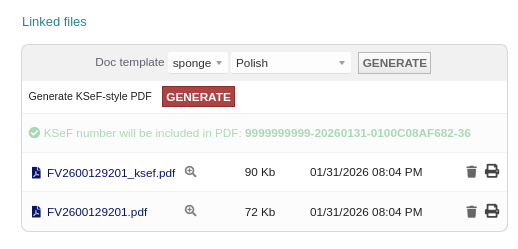
In a future version will look at replacing this separate button instead make this visualization style another template available for use in the standard way, but this was easier to implement in the near-term.
Hi and first of all - thank you very very much for your work. We were going to use additional software to handle KSEF at our companies and I hated that there wasn’t another way, not gonna lie. You have no idea how delighted I was when I saw your module here! I wish I could help, but this is way out of my league;)
I agree that incoming invoices seem to be the biggest issue in terms of handling it in an ERP system like Dolibarr. I’ll chip in my own few cents into the topic. Do you use purchase orders at your companies? Because at least for me it would be preferable to be able to choose between two different paths for incoming invoices:
- link the invoice with an existing, not yet linked incoming goods receipt (the recipt would be containing existing products or services)
- treat the invoice as a generic cost without a purchase order - like you described, with or without linking the invoice positions with products in the database (oftentimes those products are not even in the database for me).
If you wanted to automatically link the products on the invoice with the products in the database, I think my preferred option would be to have the sellers product IDs added manually to the product. It’s tedious work in the beginning, but when you have recurring business, it pays off in the long run. The Vendor SKU field in the product card should work, although then there’s also the fact that some companies use different product codes for sales offers and different product codes on invoices… But I guess the Vendor SKU field would be the best compromise if you don’t want to duplicate the data for most or almost all existing vendors.
In any case - I’m looking forward to see you how you’ll handle this issue
What is your plan for correction invoices? Do you plan to use the existing credit note system for that?
I’ve pushed 1.0.0 to GitHub and created a release for it, adding the features I mentioned above
Delpen:
I really have no plan for imported invoices just yet with the module… I think the desired process is very dependent on the company and how they use Dolibarr as well since there are (for better in the big picture) generally many ways to approach things with this software and no single right way, but feedback like this is helpful to figure out what may be the “neutral” way forwards that will work for the majority.
For now, there is not importing, it only allows displaying invoices within Dolibarr and generating a PDF to use with traditional pipeline, so no need to log into KSeF system, and I think this is sufficient for v1.0.0.
I don’t believe the KSeF transition will be entirely without bumps, but hopefully they are all solvable.
If anyone is using this, especially over the next few days, and runs into issues or something that is missing, please drop an issue on GitHub and I will try to address it as quickly as possible.
Congrats on releasing 1.0. In regards to sales invoices I have 2 open points before being able to really use the module in a production environment.
- Do you handle currencies? We have to fill in not only the currency exchange rate, but also the day from which we pulled the exchange rate. If I got it correctly, it’s this part of the scheme:
<WalutaFaktury>EUR</WalutaFaktury>
<KursPrzeliczeniowy>
<Waluta>EUR</Waluta>
<DataKursu>2025-01-09</DataKursu>
<KursNBP>4.40</KursNBP>
</KursPrzeliczeniowy>
The problem being, that stock Dolibarr doesn’t have a field for that as far as I know and in Poland you usually don’t use the date on in which the sale happened for the currency rate conversion, but rather the last working day exchange rate. - Correction invoices - I haven’t seen you writing about this anywhere, so I’m not sure if you tackled this topic yet. Mistakes are inevitable, so being able to issue those is a must have.
As a disclaimer - I still couldn’t try the module out, so I didn’t check the above points myself. Hopefully I’ll be able to play with it later during the day;)
To your two points:
-
No it does not handle currencies properly like this. It does handle invoice currencies but not the exchange rate information. I’m not yet familiar with the requirements so I’ll do some more reading on the details, but adding this is mostly a matter of mapping fields in the fa3_builder class. I know Dolibarr multicurrency module can connect to CurrencyLayer API. (Actually, NBP Web API should make it fairly straightforwards)
-
Yes, correction invoices are handled for issued invoices - if you issue a correction/credit note in Dolibarr to an invoices that was uploaded to KSeF, it will associate this correction properly with the initial invoice.
In the incoming invoices view they are partially handled. It references and displays the corrected invoice data but does not yet have a working hyperlink between them.
When trying to sync incoming invoices, I get the following error:
Fetch failed: Init HWM export failed: Failed to init export: HTTP 403:
The certificates get authenticated, so I think it should work?
I just tested on my end again, and in the Demo and Production version it properly works. I’ve gone through trying to rule out issues and 403 indicates its related to permissions.
If you are in the test environment, I could suggest trying with token instead of certificate for testing the functionality because people are frequently cancelling certificates (since everyone pulls from the same pool of limited number of them)
Alternatively, if you are using certificates in the demo or production environment and you have access to the KSeF application you can check under “Moje uprawnienia” and make sure you have access to be able to upload/download invoices. I don’t exactly recall the differences on company structure but this isn’t always automatically given just because you can authenticate into the application, and must be configured under Uprawnienia options.
–
I have been working yesterday and today for fixing the currency handling. This is a bit of an oversight because we’ve only ever done invoices in PLN so far and I haven’t gotten much use out of the multicurrency module yet, but quite important. Adding this functionality to the FA(3) builder is simpler than expected as well and there were a fair number of example foreign currency invoices from test module to compare the XML and PDF output against. Handling the date stuff is fairly significantly easier than I worried as NBP only releases rates on working days, so to be compliant we only must query NBP for rate information for week or two backwards and grab the most recent one. It needs some more work yet but plan to get this functionality out soon
You were right, it was a problem with permissions on the ksef side. I adjusted them and it works now 
Thanks for the support;)
v1.1.0 released on GitHub (Release v1.1.0 · InPoint-Automation/Dolibarr-KSeF-Module · GitHub)
Unfortunately, this requires disable/re-enabling module to update all changes, which will reset certificates/tokens. I will avoid this in the future.
As far as the importing goes, this is going to take a bit more planning to implement properly. I will slow down the update cycle now that this is at a reasonable point. Barring pressing feedback or issues the next update may be a couple months down the road.
If anyone does run into any issues, please contact here or even better create an issue on the GitHub.
v1.1.1 released fixing some issues that came up in use
https://github.com/InPoint-Automation/Dolibarr-KSeF-Module/releases/
v1.2.0 released
Dear @IAmTheRealBeef , first of all, thanks for your amazing work! Would you mind hinting if you plan on adding the import to dolibarr function for received invoices any time soon?
Thanks!
I do intend to add it in the near future, in v1.2.0 I added the foundational code for it. The complex part is matching pre-existing items, which is something that’s not particularly easy to do. As I mentioned much earlier in the forum, internally we use a python program that connects to Dolibarr’s API to speed this up on our side (e.g. matching EANs and pulling data/photos online), and added the REST endpoints to the KSeF module to make this possible with our existing automations.
For module functionality that I aim for releasing in v1.3, it will offer two paths for the user:
- Simply import the invoice, but don’t tie it to existing products. This is the simplest option and would work for accounting as all invoices reflected in the system, but isn’t useful for inventory management at all.
- Import the invoice, and on the invoice page allow choosing a product to associate each line-item with, along with a + button that allows for creating a new product for each incoming item if it doesn’t already exist, similar to adding a new Third Party when creating an invoice. This is a bit tedious until all products are in the system, but it is achievable in a nearer term.
Option 1 is very straightforwards to implement, but option 2 will take a bit more time, and I’d like to include both options in this version.
Obviously this is test invoice data, but the (still WIP version) allows for auto-matching of the Third Party and auto-matching of the product by barcode if it’s on the invoice in batch import. Otherwise, it can autogenerate a new product (albeit with somewhat limited information/data).
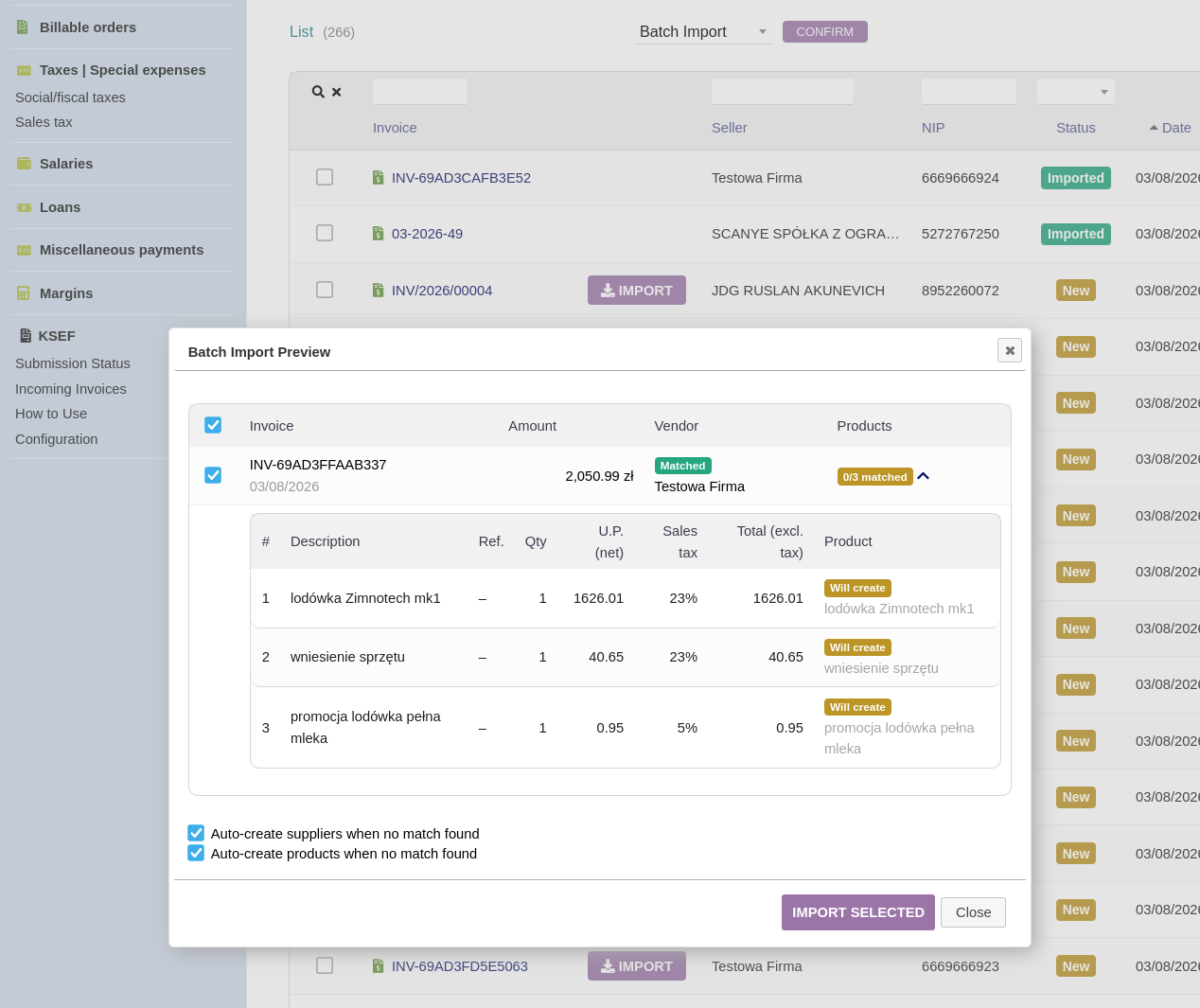
There is also the ability to import invoices individually of course, seen in the “IMPORT” button in the background of the above screenshot.
It pulls up the page below (also accessible on the Import to Dolibarr page that previously existed) and users can either create/find an existing third party and then choose to import only the line items as text in the Dolibarr vendor invoice (as described in Option 1 in the above post) or manually choose products from the product list (as described in Option 2 in the above post). I will add the auto-match on barcode functionality to this page as well.
Importing only line items without linking them to products is also possible on the batch import if “Auto-create products when no match found” is not selected.
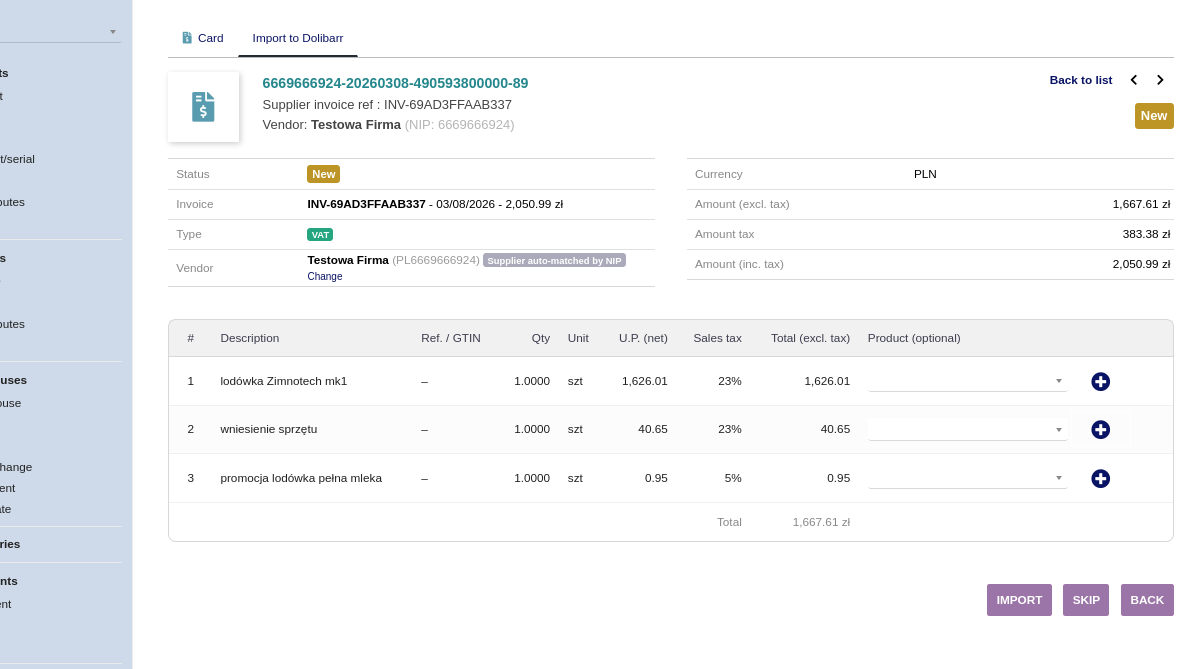
It will likely be a few more days to finish solving various edge cases and handling credit notes properly. I provide it just for initial feedback on the direction
That’s some great news for me, as I don’t keep stuff in stock, just need to issue line items to specific orders almost instantly, so it’ll solve my problem. Hell of a job man




